Practical Hood Warfare 2 tips covering spawn awareness, mode-specific scoring, positioning on each map and the launch problems you should prepare for.
Hood Warfare 2 Tips and Tricks for Winning More Fights
Win more fights by treating every spawn as contested, playing for the score each mode rewards, and fixing visibility and ping before you blame your aim. That covers the 100-review Steam sample checked on 2026-10-12. Every tip is tagged Official (store page) or Player reports (reviews and forums).
The Launch Problems You Should Prepare For
Hood Warfare 2 launched on 2026-10-08. Steam's review data captured on 2026-10-12 showed 374 reviews, 279 of them positive (74.6%) and a "Mostly Positive" label. In that capture's 100 most recent reviews, 66 were positive and 34 negative, and none had 10 hours on record (69 sat under two hours). The count moves during the day.
| Problem | What players wrote (Steam, checked 2026-10-12) | What to do |
|---|---|---|
| Spawn trapping | Negative review: "I was spawn trapped for 10x deaths from 1 guy" | Learn each map's spawn zones; never re-peek a death exit |
| Ping mismatch | Review: "Getting 80+ ping in servers where it says I will get 20 ping or under" | Judge the first 30 seconds, not the lobby number |
| Cheaters | Negative review: "It's fun but it's full of cheaters. Refunded after one game." | Report in-game; no anti-cheat details published |
| Voice chat missing | Negative review: "I think it would be very elevated with the addition of voice chat" | Use Steam chat or an external call |
| Map quality | Negative review: "bland maps that look like an asset flip" | Raise brightness and check settings before judging a map |
| Audio mix | Forum thread: "The friendly gun fire sound is too loud" | Rebalance effects volume |
"the spawns are awful", "needs a few spawn adjustments", "I was spawn trapped for 10x deaths from 1 guy" — the same complaint recurs throughout the sample. Spawn logic is not documented officially, so map knowledge is your only counter.
Spawn Awareness: Stop Running Back Down the Same Lane
Official: nothing — no spawn rules, no spawn-protection values, no spawn maps are published.
Player reports: the sample's sharpest example is a player who logged 10 straight deaths from a single opponent in two matches; the wider pattern is a trap forming the moment a team is pinned.
What actually helps, in order of payoff:
- Die twice in one spot, take another exit. Those reviews describe re-running the covered lane; cut through a house instead.
- Spawn with your crosshair up. The player who killed you is usually still watching that angle.
- Do not sprint out of a watched exit. Crosshair up beats speed when someone is already aiming at your door.
- Learn four maps, not fifty. Watch where your team reappears and you map the rotation yourself.
- Die with your team. Solo pushes into an enemy block produce those 10-death scorelines.
Mode-Specific Tips: Play What the Mode Actually Scores
Objectives below are official store-page text; the advice column is derived from those objectives, not from unpublished scoring numbers. Full objectives are on the all six modes explained page, and press coverage compares the lineup to classic Call of Duty modes (Dexerto).
| Mode | Official objective (store page) | Advice derived from it |
|---|---|---|
| Turf War | Gangs hold zones to score and push the enemy off points | Hold two zones, rotate early to the third; defending beats chasing kills |
| GangBang | Team deathmatch, most kills wins | Trades are neutral — disengage lost fights and let teammates collapse |
| Chaos | Free-for-all, most kills wins; the only non-team mode | Every angle is hostile: keep moving and third-party fights already in progress |
| Hit A Lick | Steal the enemy's package while defending your own | Once your package is home, send bodies back on defense |
| Destroy The Block | Plant or defuse; one life per round | A pick beats a frag: hold an angle and let the other side walk into it |
| Chain Snatch | Kill, then take the dropped chains and recover your team's | Kills are only half the play: collect where the firefight just ended |
Pair each mode with a setup from the best loadout for each of the six modes guide once you have unlocked enough perks and equipment.
Positioning on Each Map
The store page promises "different routes and positions to learn on each map"; four maps rotate. Middle column: confirmed. Right column: advice from that layout.
| Map | Confirmed | Positioning tip |
|---|---|---|
| Downtown | City streets, high-rise brick buildings; the trailer opens on its skyline | Streets are long sightlines: cross between buildings and check windows above |
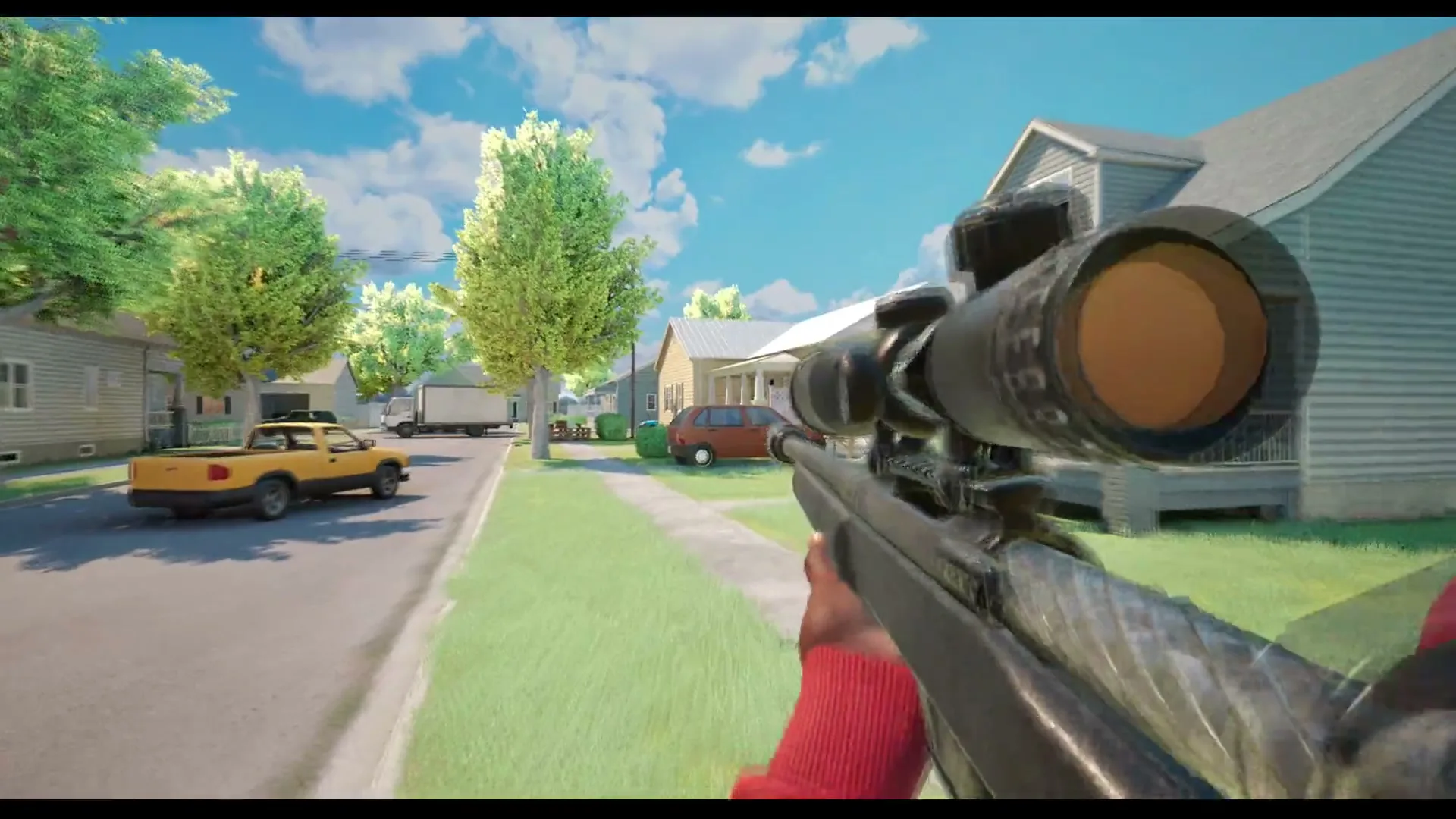
| Suburbs | Detached houses, lawns and open roads (the image at the top) | The road is a sniper lane: move house to house and use parked cars as cover |
| Chicago Mall | Atrium, escalators, second-floor galleries, named shops | The gallery overhangs the floor below: assume someone is on the railing above |
| The Trenches | Only the name is official — no screenshots or description published | Nothing to plan yet; learn its spawn exits first when it appears |
Route breakdowns: Downtown, Suburbs, Chicago Mall, and The Trenches as details land.
If a map looks murky, raise brightness before you write off a lost duel — once per map, not once per death.
Loadouts, Attachments and Progression
Official: loadouts are built from perks and equipment; attachment slots are sights, magazines, grips, suppressors and others; Reputation levels unlock more weapons and equipment; weapon challenges unlock attachments; kills with each gun unlock its skins. XP values, level thresholds and perk names are unpublished — any numeric table you see is a guess.
Tips that follow from those mechanics:
- Run challenges on the gun you actually use — attachments come from weapon challenges, not playtime, so an untouched gun never grows.
- Treat the three tracks separately: Reputation for weapon access, challenges for attachments, raw kills for skins.
- Check slot coverage before maining a gun. Reviewers are already asking the developer to "add more hood warfare staples to the roster of weapons", so the gun pool may stay thin for a while. See the weapons list and the unlock framing in Reputation, XP and leveling.
Settings, Audio and Ping Fixes Before Your First Match
- Ping: the lobby number survives contact with the match only sometimes ("80+ ping in servers where it says I will get 20"). Judge the first minute by feel. One reviewer blames "constant host changes with 100+ ping"; the server architecture is unpublished, so any hosting theory is unverified.
- Visibility: raise brightness before your first match and on each new map; the trailer's Downtown plays at dusk.
- Audio: rebalance effects volume so footsteps survive a firefight; the loud-friendly-gunfire forum thread is real.
- Voice: no voice chat as of 2026-10-12, so arrange calls with your group before you queue.
Do this via the best settings for FPS, visibility and audio guide, and check the system requirements — the floor is a GTX 1660 / RX 5600 XT with 8 GB RAM.
Practice Without the Pressure: Bot Matches
Official: you can set up a match against bots, choose the map, mode and match settings, and fill teams with bots — the cleanest way to learn spawn exits without cheaters or ping spikes. Setup is in the bot mode guide; new players should start with the beginner guide, then return here.
Frequently Asked Questions
What are the best Hood Warfare 2 tips for a beginner? Fix visibility and ping in settings, learn spawn exits in bot matches, then pick one mode and learn what it scores — spawn discipline and objective play beat raw aim except in Chaos.
How do you stop getting spawn killed? Never re-peek the exit you died on, walk out crosshair-up, and learn where your team reappears. No spawn protection is documented — map knowledge is your shield.
Does Hood Warfare 2 have voice chat or crossplay? No voice chat as of 2026-10-12 — reviewers ask for it. Crossplay is unannounced: a Windows-only Steam release, with console status and crossplay plans unpublished.
Where do attachments, perks and skins come from? Attachments come from weapon challenges, skins from kills with each gun, and more weapons from Reputation.
Is the game getting updates? The launch announcement promised updates, but no official patch notes exist as of 2026-10-12. The patch notes timeline tracks them as they appear.
Official source: Hood Warfare 2 on Steam — mode, map, loadout, progression and bot text from that page. Review totals and quotes come from Steam user reviews (captured 2026-10-12); the thread title from the Steam discussions board.
More Hood Warfare 2 Guides
Does Hood Warfare 2 have crossplay? There is no cross-platform support announced. Here is how to party up with friends in private matches instead.
A guide to Downtown in Hood Warfare 2: street layout, flanking lanes, cover and the positions that decide fights across Chicago's high-rise blocks.
Hood Warfare 2 asks you to pick a side. See which gangs appear in official footage, what the developer has confirmed, and how faction choice works.
Hood Warfare 2 ships with six modes: Turf War, GangBang, Chaos, Hit A Lick, Destroy The Block and Chain Snatch. Here is how each one is won.
Hood Warfare 2 launched on October 8, 2026. Track every official update, the developer's patch promises and the issues players want fixed first.
How many people are playing Hood Warfare 2? The viral launch pushed the peak to 4,491 players, far above the 2023 original's all-time peak of 68.
Is Hood Warfare 2 on PS5? The store only lists Windows, and no console announcement exists. Here is the full evidence trail as of October 12, 2026.
Hood Warfare 2's progression runs on three tracks: reputation levels unlock gear, weapon challenges unlock attachments, and kills unlock skins.